What Is a VESA Pattern on a TV? Meaning, Sizes and Limits
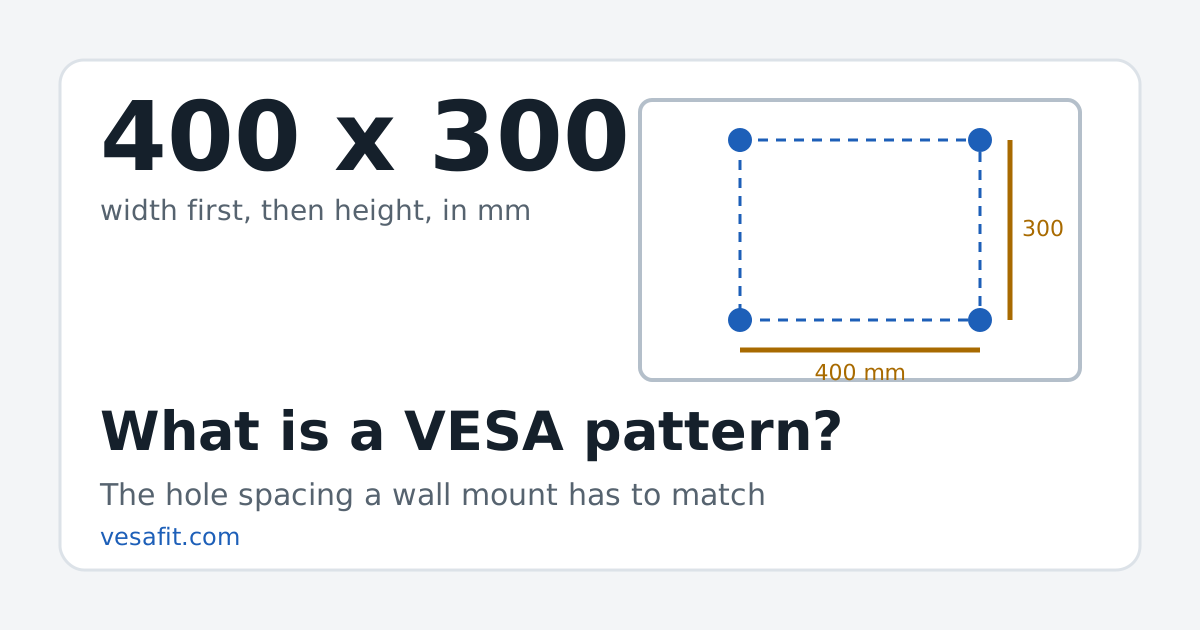
A VESA pattern on a TV is the spacing of the four threaded mounting holes on its back, given in millimetres with the width first: a 400 x 300 TV has holes 400 mm apart side to side and 300 mm apart top to bottom. It is the number a wall mount or stand has to match. The name comes from the Video Electronics Standards Association (VESA), whose Flat Display Mounting Interface standard (FDMI, also called MIS) defines the patterns.
What the two numbers mean
Both numbers are distances between hole centres, not the size of the TV, the screen or the bracket.
- First number: width. Horizontal distance between the left and right holes.
- Second number: height. Vertical distance between the top and bottom holes.
- Unit: millimetres. "VESA 300" or "300 x 300 mm" is a square pattern; "300 x 200" is a rectangle 300 mm wide and 200 mm tall.
So a pattern tells a mount maker where to put the bolts. It says nothing on its own about screen size or weight; those are separate checks.
The VESA patterns TVs actually use
Of the 346 current TVs on VESA Fit, 333 have a pattern published on the maker's own product page, spread over 16 different patterns. The most common is 300 x 200 (67 models). Here they are with the inch equivalents mount boxes sometimes print:
| Pattern (mm, W x H) | Inches | TVs here | Screen sizes |
|---|---|---|---|
| 300 x 200 | 11.8 x 7.9 | 67 | 42–77" |
| 300 x 300 | 11.8 x 11.8 | 64 | 48–77" |
| 400 x 400 | 15.7 x 15.7 | 47 | 65–86" |
| 600 x 400 | 23.6 x 15.7 | 45 | 75–100" |
| 200 x 200 | 7.9 x 7.9 | 42 | 32–65" |
| 400 x 300 | 15.7 x 11.8 | 38 | 50–85" |
| 100 x 100 | 3.9 x 3.9 | 7 | 24–40" |
| 600 x 500 | 23.6 x 19.7 | 7 | 85–98" |
| 200 x 300 | 7.9 x 11.8 | 6 | 43–65" |
| 1000 x 600 | 39.4 x 23.6 | 3 | 115" |
| 1000 x 700 | 39.4 x 27.6 | 2 | 115" |
| 100 x 200 | 3.9 x 7.9 | 1 | 43" |
| 200 x 100 | 7.9 x 3.9 | 1 | 43" |
| 400 x 200 | 15.7 x 7.9 | 1 | 65" |
| 300 x 500 | 11.8 x 19.7 | 1 | 85" |
| 500 x 600 | 19.7 x 23.6 | 1 | 98" |
160 of the 333 use a square pattern; the other 173 are rectangles such as 300 x 200, 400 x 300 and 600 x 400. Each pattern has its own page listing every TV that uses it.
Same screen size, different patterns
The pattern is set by each model's design, not by its diagonal. In 16 of the 21 screen sizes listed here, the TVs use more than one pattern:
| Screen size | TVs | Patterns in use (models) |
|---|---|---|
| 24-inch | 2 | 100 x 100 (2) |
| 27-inch | 1 | 100 x 100 (1) |
| 32-inch | 5 | 100 x 100 (3), 200 x 200 (2) |
| 40-inch | 2 | 100 x 100 (1), 200 x 200 (1) |
| 42-inch | 4 | 200 x 200 (2), 300 x 200 (2) |
| 43-inch | 21 | 200 x 200 (16), 300 x 200 (2), 100 x 200 (1), 200 x 100 (1), 200 x 300 (1) |
| 48-inch | 8 | 300 x 200 (7), 300 x 300 (1) |
| 50-inch | 20 | 200 x 200 (10), 300 x 200 (4), 300 x 300 (3), 200 x 300 (2), 400 x 300 (1) |
| 55-inch | 48 | 300 x 200 (23), 300 x 300 (15), 200 x 200 (7), 200 x 300 (2), 400 x 300 (1) |
| 58-inch | 2 | 200 x 200 (2) |
| 65-inch | 62 | 300 x 200 (21), 300 x 300 (20), 400 x 300 (13), 400 x 400 (4), 200 x 200 (2), 200 x 300 (1), 400 x 200 (1) |
| 70-inch | 4 | 300 x 300 (3), 400 x 300 (1) |
| 75-inch | 54 | 400 x 400 (21), 300 x 300 (15), 400 x 300 (14), 300 x 200 (3), 600 x 400 (1) |
| 77-inch | 16 | 300 x 300 (7), 300 x 200 (5), 400 x 300 (3), 400 x 400 (1) |
| 83-inch | 10 | 400 x 400 (8), 400 x 300 (2) |
| 85-inch | 35 | 600 x 400 (18), 400 x 400 (11), 400 x 300 (3), 600 x 500 (2), 300 x 500 (1) |
| 86-inch | 11 | 600 x 400 (9), 400 x 400 (2) |
| 97-inch | 2 | 600 x 400 (2) |
| 98-inch | 14 | 600 x 400 (8), 600 x 500 (5), 500 x 600 (1) |
| 100-inch | 7 | 600 x 400 (7) |
| 115-inch | 5 | 1000 x 600 (3), 1000 x 700 (2) |
That is why "what VESA is a 65-inch TV?" has no single answer. Look up the exact model in the finder, or measure the holes.
What the standard covers
VESA's FDMI overview states its purpose plainly: "The purpose of this standard is to define mounting interface standards for Flat Displays (FDs)". It splits displays into parts by diagonal and sets a weight ceiling for each:
| Part | Diagonal | Weight up to |
|---|---|---|
| B | 4" to 7.9" | 2 kg (4.4 lb) |
| C | 8" to 11.9" | 4.5 kg (10 lb) |
| D | 12" to 22.9" | 14 kg (30.8 lb) |
| E | 23" to 30.9" | 22.7 kg (50 lb) |
| F | 31" to 90" | 113.6 kg (250 lb) |
Part F, for displays of 31 inches and up, also depends on the screws: M6 screws are rated to 50 kg (110 lb) and M8 to 113.6 kg (250 lb). The first standard in the family dates from 1997, and it was extended in 2006 with larger screw patterns for TVs.
Two things follow for today's sets:
- Bigger than the standard. FDMI's range stops at 90 inches. 29 TVs here are larger (97", 98", 100", 115"), so the standard's size table does not describe them; the makers of 28 of them still publish a hole pattern, listed above.
- Heavier than M6. 36 of the 338 TVs with a published weight are over 110 lb without the stand, the M6 limit in Part F; the heaviest is the Sony K115XR90M2 at 235.3 lb. None exceeds Part F's 250 lb. Use the screws the TV's manual names.
Part F's pattern table, as Wikipedia summarises it, lists square patterns, while 173 of the TVs here use rectangles. Mounts handle that by offering a range of slots.
What "VESA compatible" means on a mount
A wall mount lists the smallest and largest pattern it fits, for example "200 x 100 to 600 x 400". Your TV fits when its width is inside the width range and its height is inside the height range, and its weight is at or under the mount's rating. VESA licenses a "VESA mounting compliant" logo, but, in Wikipedia's words, "Many compliant or almost compliant devices do not display the logo", so the printed pattern range is what to check. The mount checker does that comparison for any TV listed here, and the wall mount guide covers mount types.
Screws are part of the pattern, not the TV size
Small patterns (Parts B to E, up to 200 x 100) use M4 screws; Part F uses M6 or M8, and the screw length is the bracket's thickness plus the depth the standard allows. Details and spacers are in the screw-size guide.
13 of the TVs listed have no pattern on the maker's page. Some of those are sold with the maker's own bracket instead of standard holes (the model page says so); for the rest, the manual or a tape measure is the route.
Sources
- VESA, FDMI Overview (PDF): purpose, parts B to F, diagonal ranges and weight ceilings. Checked 2026-10-26.
- Wikipedia, VESA mount: history, Part F screw limits and the compliance logo. Checked 2026-10-26.
- Wikipedia, Flat Display Mounting Interface: screw sizes by part. Checked 2026-10-20.
- Manufacturer product pages (LG, Samsung, Sony, TCL, VIZIO) for every TV's pattern and weight, checked 2026-10-20, 2026-10-21 and 2026-10-26; see the methodology.
Questions
What does VESA stand for?
Video Electronics Standards Association, the industry group that publishes the Flat Display Mounting Interface standard (FDMI, also called the VESA Mounting Interface Standard, MIS) that defines the hole patterns.
What does 400 x 300 mean on a TV?
The four mounting holes on the back are 400 mm apart side to side and 300 mm apart top to bottom, measured centre to centre. Width always comes first.
Is a VESA pattern the same as the TV size?
No. It describes only the hole spacing on the back. TVs of the same screen size use several different patterns, so look up the exact model.
What does VESA compatible mean on a wall mount?
The mount's plate has slots for a range of hole patterns, printed as smallest to largest (for example 200 x 100 to 600 x 400). A TV fits when both its width and height sit inside that range and its weight is within the mount's rating.
Does every TV have a VESA pattern?
Most do, but not all publish one. Some designs ship with the maker's own bracket instead of standard holes, and some makers' spec pages leave the pattern out.